PDF tables to CSV/XLSX with a quality report
Synthetic data only. Self-initiated demonstration; no client engagement or independent human certification is claimed.
I use AI coding tools; every change ships with automated tests and a written handoff.
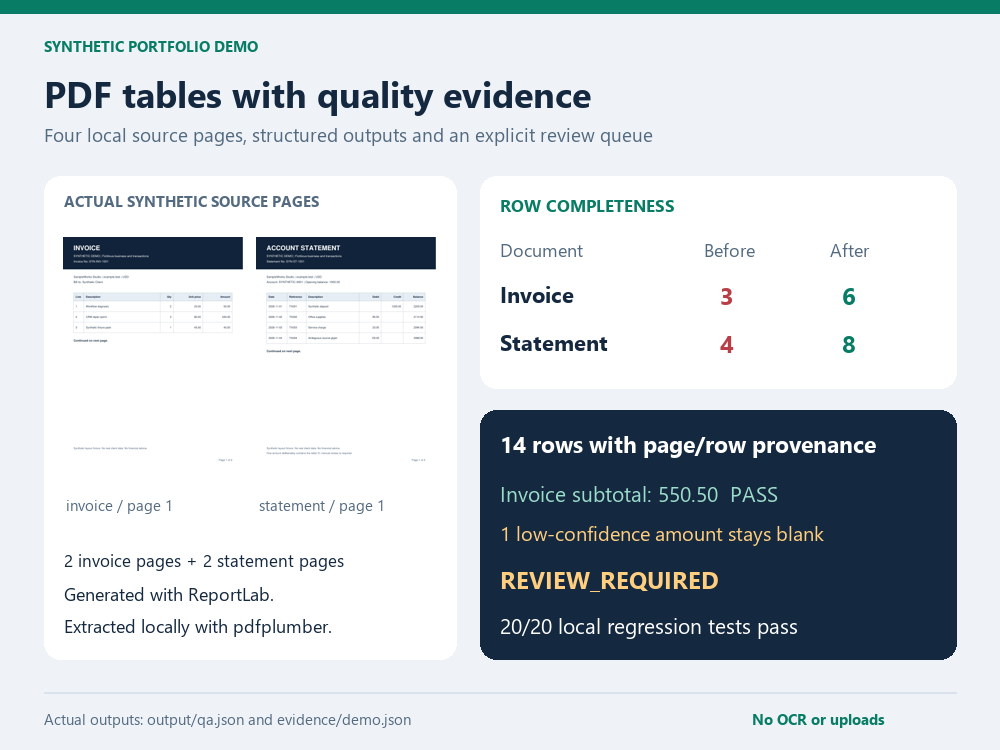
A realistic invoice and account statement are generated locally, with two pages each. A deliberately broken extractor reads only page 1, splits descriptions by spaces and silently replaces the letter O with zero. The repaired pipeline reads ruled tables on every page, preserves row provenance and reconciles quantities, amounts and balances using Decimal arithmetic.
Reproduce locally
Requires Python 3.10+ and already-available reportlab, pdfplumber and openpyxl; regression tests also use pypdf. Pillow is used only for portfolio/review images. The verified environment is recorded in evidence/dependencies.json. No online OCR, language model, API or installation is used by these commands:
python -B demo.py
python -B tests/run.py
For the extraction step alone, use python -B extract.py. Optional arguments: --source <folder> and --output <folder>. The source folder must contain the two expected fixture names, invoice.pdf and statement.pdf. Use representative layout scoping before adapting it to other documents.
Deliverables and actual result
| Deliverable | File | Verified result |
|---|---|---|
| Synthetic source documents | sources/invoice.pdf, sources/statement.pdf |
4 pages total |
| Extracted tables | output/invoice.csv, output/statement.csv |
6 invoice rows + 8 statement rows |
| Spreadsheet | output/extracted.xlsx |
Invoice, statement and review queue; typed numbers/dates; no executable source formulas |
| QA report | output/QA_REPORT.md, output/qa.json |
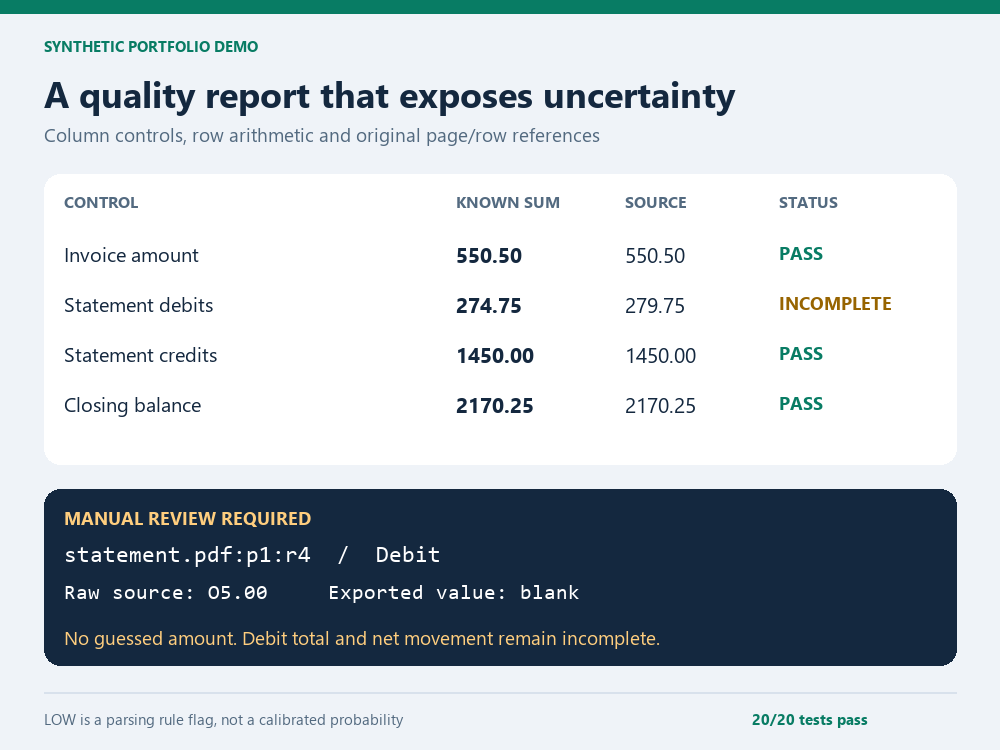
Invoice total 550.50 agrees; statement requires review |
| Review queue | output/review_queue.csv |
1 cell: statement.pdf:p1:r4, Debit, raw O5.00 |
| Before/after proof | evidence/demo.json, evidence/before-*.csv |
Baseline only 3 invoice + 4 statement rows |
| Regression record | evidence/tests.json |
20 local tests pass |
The uncertain debit stays blank in the outputs. Its raw source text is retained in the review queue. Known debits sum to 274.75 against the printed 279.75, so debit reconciliation is INCOMPLETE. The pipeline does not infer 5.00 from the totals or running balance. Credits and closing balance agree, but these checks cannot erase the unresolved debit. Overall QA is REVIEW_REQUIRED.
Each row includes source_pdf, source_page, source_row and a combined provenance. Row numbers are one-based data-row positions within the source page's table, excluding the table header. Source page order is retained.
Fixes tested
All pages, declared page sequence, missing/duplicate/reordered page refusal and declared row counts; exact multiword descriptions; strict decimal parsing; line quantity-times-rate checks; invoice totals; statement debit/credit totals; per-row balance arithmetic; low-confidence review queue; CSV and XLSX agreement; formula-like text escaped; typed spreadsheet cells; unsupported layouts fail closed; wrong totals generate failed QA and CLI exit 2; deterministic structured results on repeated runs.
Exit 0 means processing completed, including an explicitly flagged review outcome. Check overall_quality before accepting the data. Exit 2 means a numeric/row-count control failed. Unsupported layouts and invalid files raise an error. No command silently establishes that a review-required file is ready for financial use.
Limits and review
Only these two known text-based, ruled-table layouts are supported. This is not an OCR system. Scans, handwriting, merged cells, unusual fonts, unknown page layouts, missing/control-free documents and automatic layout discovery are outside scope. A document may match totals and still contain offsetting errors; row counts and totals are useful controls, not universal accuracy proof. LOW is a deterministic rule flag, not a calibrated confidence score. Review of the flagged amount is deliberately unresolved.
PDF pages were rendered and visually checked. The workbook was round-tripped with openpyxl and its stored values/types reviewed; native Excel/Google Sheets was not exercised. CSV preserves decimal text; XLSX stores typed numeric values, so normal spreadsheet numeric precision applies. Review using AI coding tools covered extraction boundaries, Decimal controls, output typing, injection handling, provenance and failure states. Use a paid pilot and client acceptance before scaling to new layouts.
Read DIAGNOSIS_REPORT.md for the sample $25 assessment and HANDOFF.md for run/verify/rollback. License: MIT.
Regenerate portfolio images
After generating the evidence, optionally run python -B make_images.py. This requires locally installed Pillow; the PDF project also uses PyMuPDF for source-page thumbnails and openpyxl for stored-workbook previews. No font or image asset is downloaded. The PNGs are 1000x750 and derived from the recorded outputs. Native app screenshots are not claimed.